
آشنایی با Neon؛ پستگرس سرورلس
اگر چند سال است که با Postgres کار میکنید، احتمالاً با همان الگوی همیشگی آشنایید: یک سرور (یا یک کلاستر RDS) که همیشه روشن است، صورتحساب ماهانهاش هم همیشه روشن است، و هر بار که میخواهید یک محیط آزمایشی برای یک تیکت بسازید، یا باید از روی پشتیبان یک دیتابیس دیگر بالا بیاورید یا کل دادهها را در محیط استیجینگ به اشتراک بگذارید.
Neon یک نسخهی سرورلس از Postgres است که این الگو را عوض میکند.
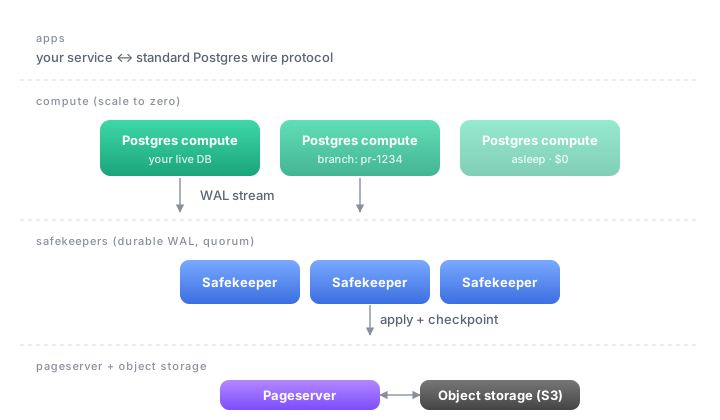
چیزی که Neon فرق دارد
- جدا بودن compute و storage. ذخیرهسازی روی S3 مینشیند و compute هر وقت لازم باشد بالا میآید. اگر کسی به دیتابیس وصل نباشد، compute بهخواب میرود (scale-to-zero) و در عمل پولی هم برایش نمیدهید.
- برنچ گرفتن از دیتابیس مثل گیت. یک کپی نوشتاری-روی-نوشتن از کل دیتابیس را در چند ثانیه بسازید. مناسب برای محیط آزمایشی هر pull request، یا تست مهاجرتهای schema بدون ترس از خراب کردن production.
- بازگشت در زمان. نسخههای قبلی دیتابیس بهصورت پیشفرض نگهداشته میشوند؛ میتوانید یک برنچ از پنج دقیقهی پیش بسازید بدون هیچ کار اضافه.
- سازگار با هر کتابخانهی Postgres. پروتکل همان Postgres است، پس درایور psycopg، pgx، Prisma، Drizzle، SQLAlchemy و … بدون تغییر کار میکنند.
یک نمونهی سریع
ساخت دیتابیس از CLI:
1
2
3
npm i -g neonctl
neonctl auth
neonctl projects create --name my-app
اتصال از پایتون با psycopg:
1
2
3
4
5
6
7
import os
import psycopg

with psycopg.connect(os.environ["DATABASE_URL"]) as conn:
    with conn.cursor() as cur:
        cur.execute("select version()")
        print(cur.fetchone()[0])
ساخت یک برنچ برای یک pull request:
1
neonctl branches create --name pr-1234 --parent main
این یک دیتابیس کامل و قابلنوشتن میسازد که محتوای دقیق دیتابیس اصلی را در لحظهی ساخت دارد، با یک connection string جدا.
کجاها به درد میخورد
- پروژههایی که الگوی مصرفِ نامنظم دارند (مثلاً ابزار داخلی یا کرونجابها).
- محیطهای استیجینگ به ازای هر PR که میخواهید واقعاً جدا باشند.
- پروژههای جانبی که نمیخواهید برای دیتابیسشان ماهی ۲۰ دلار بدهید وقتی دو روز در ماه استفاده میشود.
- اپلیکیشنهای Edge / Serverless که تعداد کانکشن زیاد میسازند؛ Neon یک HTTP/WebSocket proxy برای این کار دارد.
کجاها بهدردتان نمیخورد
- بار خیلی سنگین و پایدار write که نیاز به یک نمونهی همیشه گرم با CPU/RAM ثابت دارد؛ آنجا یک Postgres مدیریتشدهی معمولی هم میتواند ارزانتر باشد.
- وقتی مقررات data residency خیلی محدود است و باید روی زیرساخت خودتان بنشیند.
آیا میتوان Neon را self-hosted اجرا کرد؟
پاسخ کوتاه: بله، اما بهسادگی Postgres معمولی نیست.
کد Neon زیر مجوز Apache 2.0 روی github.com/neondatabase/neon متنباز است و میتوانید روی Kubernetes خودتان بالا بیاوریدش. اما برخلاف یک Postgres ساده، Neon یک سامانهی توزیعشدهی سهلایه است:
- Compute nodes که خود Postgres را اجرا میکنند
- Safekeeperها برای quorum روی WAL
- Pageserver که داده را روی Object Storage (S3 یا سازگار با S3) نگه میدارد
بهعلاوه به یک Object Store (مثل S3, MinIO, Ceph RGW) و یک کنسول/کنترلپلِین برای مدیریت پروژهها و برنچها نیاز دارید. این یعنی برای جمع و جور نگهداشتنش به تجربهی عملیاتی روی Kubernetes و storage layer نیاز دارید؛ همان دلیلی که برای بیشتر تیمها استفاده از سرویس مدیریتشدهی Neon (که از مه ۲۰۲۵ بخشی از Databricks است) منطقیتر است.
اگر هدف فقط Postgres روی زیرساخت خودی است و به branching و scale-to-zero نیاز ندارید، یک Postgres مدیریتشدهی معمولی (CloudNativePG, Stolon, یا حتی یک نمونهی ساده روی VM) راه سادهتری است.
Introducing Neon: serverless Postgres
If you’ve been around Postgres long enough, you know the usual shape: one always-on server (or an RDS cluster), an always-on monthly bill, and any time you need a sandbox for a ticket you either restore from a snapshot or share the staging database with the rest of the team.
Neon is a serverless take on Postgres that changes that shape.
What’s different
- Separation of compute and storage. Storage lives on S3; compute spins up on demand and goes to sleep when no one is connected (scale-to-zero), meaning you effectively don’t pay for idle.
- Git-style database branches. Spin up a copy-on-write clone of the whole database in seconds. Perfect for a per-PR preview environment, or for testing a schema migration without touching production.
- Point-in-time restore by default. Older versions of the database are retained, so you can branch from “five minutes ago” without setting up anything special.
- Wire-compatible. It speaks the Postgres protocol, so existing drivers (psycopg, pgx, Prisma, Drizzle, SQLAlchemy, …) work as-is.
Quick taste
Create a project from the CLI:
1
2
3
npm i -g neonctl
neonctl auth
neonctl projects create --name my-app
Connect from Python with psycopg:
1
2
3
4
5
6
7
import os
import psycopg

with psycopg.connect(os.environ["DATABASE_URL"]) as conn:
    with conn.cursor() as cur:
        cur.execute("select version()")
        print(cur.fetchone()[0])
Branch the database for a pull request:
1
neonctl branches create --name pr-1234 --parent main
You get a fully writable database that contains exactly what main had at
branch time, with its own connection string.
Where it shines
- Projects with spiky or unpredictable traffic (internal tools, cron jobs).
- Per-PR staging environments that really need to be isolated.
- Side projects where you don’t want to pay $20/month for a database you use two days a month.
- Edge / serverless apps that create a lot of short-lived connections; Neon ships an HTTP/WebSocket proxy built for this.
Where it doesn’t
- Heavy, steady write workloads that want a permanently-warm instance with fixed CPU/RAM; a regular managed Postgres can come out cheaper.
- Strict data residency rules that require the database to live on your own infrastructure.
Can you self-host Neon?
Short answer: yes, but it’s not as simple as plain Postgres.
Neon’s code is Apache 2.0 licensed and lives at github.com/neondatabase/neon. You can run it on your own Kubernetes cluster. But unlike vanilla Postgres, Neon is a three-layer distributed system:
- Compute nodes that run Postgres itself
- Safekeepers for WAL quorum
- Pageserver that persists data to S3-compatible object storage (S3, MinIO, Ceph RGW, …)
You also need a small control plane to manage projects and branches. In practice that means real operational expertise in Kubernetes and a storage layer; for most teams Neon’s managed service (a Databricks company since May 2025) is the saner choice.
If your only goal is Postgres on your own infrastructure and you don’t need branching or scale-to-zero, a regular managed Postgres setup (CloudNativePG, Stolon, or even a single VM) is a much simpler path.